Archive for the ‘Issue Mapping’ Category
Beyond words: visualising arguments using issue maps
Anyone who has struggled to follow a complex argument in a book or article knows from experience that reasoning in written form can be hard to understand. Perhaps this is why many people prefer to learn by attending a class or viewing a lecture rather than by reading. The cliché about a picture being worth more than a large number of words has a good deal of truth to it: visual representations can be helpful in clarifying complex arguments. In a recent post, I presented a quick introduction to a visual issue mapping technique called IBIS (Issue Based Information System), discussing how it could be used on complex projects. Now I follow up by demonstrating its utility in visualising complex arguments such as those presented in research papers. I do so by example: I map out a well known opinion piece written over two decades ago – Fred Brooks’ classic article, No Silver Bullet, (abbreviated as NSB in the remainder of this article).
[Note: those not familiar with IBIS may want to read one of the introductions listed here before proceeding]
Why use NSB as an example for argument mapping? Well, for a couple of reasons:
- It deals with issues that most software developers have grappled with at one time or another.
- The piece has been widely misunderstood (by Brooks’ own admission – see his essay entitled No Silver Bullet Refired, published in the anniversary edition of The Mythical Man Month).
First, very briefly, for those who haven’t read the article: NSB presents reasons why software development is intrinsically hard and consequently conjectures that “silver bullet” solutions are impossible, even in principle. Brooks defines a silver bullet solution for software engineering as any tool or technology that facilitates a tenfold improvement in productivity in software development.
To set the context for the discussion and to see the angle from which Brooks viewed the notion of a silver bullet for software engineering, I can do no better than quote the first two paragraphs of NSB:
Of all the monsters that fill the nightmares of our folklore, none terrify more than werewolves, because they transform unexpectedly from the familiar into horrors. For these, one seeks bullets of silver that can magically lay them to rest.
The familiar software project, at least as seen by the non-technical manager, has something of this character; it is usually innocent and straightforward, but is capable of becoming a monster of missed schedules, blown budgets, and flawed products. So we hear desperate cries for a silver bullet—something to make software costs drop as rapidly as computer hardware costs do.
The first step in mapping out an argument is to find the basic issue that it addresses. That’s easy for NSB; the issue, or question, is: why is there no silver bullet for software development?
Brooks attempts to answer the question via two strands:
- By examining the nature of the essential (intrinsic or inherent) difficulties in developing software.
- By examining the silver bullet solutions proposed so far.
That gives us enough for us to begin our IBIS map …
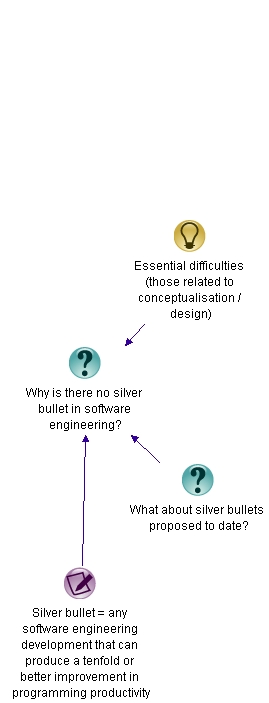
Issue Map – Stage 1
The root node of the map – as in all IBIS maps – is a question node. Responding to the question, we have an idea node (Essential difficulties) and another question node (What about silver bullet solutions proposed to date). We also have a note node which clarifies what is meant by a silver bullet solution.
The point regarding essential difficulties needs elaboration, so we ask the question– What are essential difficulties?
According to Brooks, essential difficulties are those that relate to conceptualisation – i..e. design. In contrast, accidental (or non-essential) difficulties are those pertaining to implementation. Brooks examines the nature of essential difficulties – i.e. the things that make software design hard. He argues that the following four properties of software systems are the root of the problem:
Complexity: Beyond the basic syntax of a language, no two parts of a software system are alike – this contrasts with other products (such as cars or buildings) where repeated elements are common. Furthermore, software has a large number of states, multiplied many-fold by interactions with other systems. No person can fully comprehend all the consequences of this complexity. Furthermore, no silver bullet solution can conquer this problem because each program is complex in unique ways.
Conformity: Software is required to conform to arbitrary business rules. Unlike in the natural sciences, these rules may not (often do not!) have any logic to them. Further, being the newest kid on the block, software often has to interface with disparate legacy systems as well. Conformity-related issues are external to the software and hence cannot be addressed by silver bullet solutions.
Changeability: Software is subject to more frequent change than any other part of a system or even most other manufactured products. Brooks speculates that this is because most software embodies system functionality (i.e. the way people use the system), and functionality is subject to frequent change. Another reason is that software is intangible (made of “thought stuff”) and perceived as being easy to change.
Invisibility: Notwithstanding simple tools such as flowcharts and modelling languages, Brooks argues that software is inherently unvisualisable. The basic reason for this is that software – unlike most products (cars, buildings, silicon chips, computers) – has no spatial form.
These essential properties are easily captured in summary form in our evolving argument map:

Issue Map – Stage 2
Brooks’ contention is that software design is hard because every software project has to deal with unique manifestations of these properties.
Brooks then looks at silver bullet solutions proposed up to 1987 (when the article was written) and those on the horizon at the time. He finds most of these address accidental (or non-intrinsic) issues – those that relate to implementation rather than design. They enhance programmer productivity – but not by the ten-fold magnitude required for them to be deemed silver bullets. Brooks reckons this is no surprise: the intrinsic difficulties associated with design are by far the biggest obstacles in any software development effort.
In the map I club all these proposed solutions under “silver bullet solutions proposed to date.”
Incorporating the above, the map now looks like:

Issue Map – Stage 3
[For completeness here’s a glossary of abbreviations: OOP – Object-oriented programming; IDE – Integrated development environment; AI – Artificial intelligence]
The proposed silver bullets lead to incremental improvements in productivity, but they do not address the essential problem of design. Further, some of the solutions have restricted applicability. These points are captured as pros and a cons in the map (click on the map to view a larger image):

Issue Map – Stage 4
It is interesting to note that in his 1997 article, No Silver Bullet Refired , which revisited the questions raised in NSB, Brooks found that the same conclusions held true. Furthermore, at a twentieth year retrospective panel discussion that took place during the 22nd International Conference on Object-Oriented Programming, Systems, Languages, and Applications, panellists again concluded that there’s no silver bullet – and none likely.
Having made his case that no silver bullet exists, and that none are likely, Brooks finishes up by outlining a few promising approaches to tackling the design problem. The first one, Buy don’t build, is particularly prescient in view of the growth of the shrink-wrapped software market in the two decades since the first publication of NSB. The second one – rapid prototyping and iterative/incremental development – is vindicated by the widespread adoption and mainstreaming of agile methodologies. The last one, nurture talent, perhaps remains relatively ignored. It should be noted that Brooks considers these approaches promising, but not silver bullets; he maintains that none of these by themselves can lead to a tenfold increase in productivity.
So we come to the end of NSB and our map, which now looks like (click on the map to view a larger image):

Final Map
The map captures the essence of the argument in NSB – a reader can see, at a glance, the chain of reasoning and the main points made in the article. One could embellish the map and improve readability by:
- Adding in details via note nodes, as I have done in my note explaining what is meant by a silver bullet.
- Breaking up the argument into sub-maps – the areas highlighted in yellow in each of the figures could be hived off into their own maps.
But these are details; the essence of the argument in NSB is captured adequately in the final map above.
In this post I have attempted to illustrate, via example, the utility of IBIS in constructing maps of complicated arguments. I hope I’ve convinced you that issue maps offer a simple way to capture the essence of a written argument in an easy-to-understand way.
Perhaps the cliche should be revised: a picture may be worth a thousand words, but an issue map is worth considerably more.
IBIS References on the Web
For a quick introduction, I recommend Jeff Conklin’s introduction to IBIS on the Cognexus site (and the links therein) or my piece on the use of IBIS in projects. If you have some time, I highly recommend Paul Culmsee’s excellent series of posts: the one best practice to rule them all.
Capturing project knowledge using issue maps
Here’s a question that’s been on my mind for a while: Why do organisations find it difficult to capture and transmit knowledge created in projects?
I’ll attempt an answer of sorts in this post and point to a solution of sorts too – taking a bit of a detour along the way, as I’m often guilty of doing…
Let us first consider how knowledge is generated on projects. In project environments, knowledge is typically created in response to a challenge faced. The challenge may be the project objective itself, in which case the knowledge created is embedded in the product or service design. On the other hand it could be a small part of the project: say, a limitation of the technology used, in which case the knowledge might correspond to a workaround discovered by a project team member. In either case, the existence of an issue or challenge is a precondition to the creation of knowledge. The project team (or a subset of it) decides on how the issue should be tackled. They do so incrementally; through exploration, trial and error and discussion – creating knowledge in the bargain.
In a nutshell: knowledge is created as project members go through a process of discovery. This process may involve the entire team (as in the first example) or a very small subset thereof (as in the second example, where the programmer may be working alone). In both cases, though, the aim is to understand the problem, explore potential solutions and find the “best” one thus creating new knowledge.
Now, from the perspective of project and organisational learning, project documentation must capture the solution and the process by which it was developed. Typically, most documentation tends to focus on the former, neglecting the latter. This is akin to presenting a solution to a high school mathematics problem without showing the intervening steps. My high school maths teacher would’ve awarded me a zero for such an effort regardless of the whether or not my answer was right. And with good reason too: the steps leading up to a solution are more important than the solution itself. Why? Because the steps illustrate the thought processes and reasoning behind the solution. So it is with project documentation. Ideally, documentation should provide the background, constraints, viewpoints, arguments and counter-arguments that go into the creation of project knowledge.
Unfortunately, it seldom does.
Why is this so? An answer can be found in a farsighted paper, entitled Designing Organizational Memory: Preserving Intellectual Assets in a Knowledge Economy, published by Jeff Conklin 1997. In the paper Conklin draws a distinction between formal and informal knowledge; terms that correspond to the end-result and the process discussed in the previous paragraph.To quote from his paper, formal knowledge is the “…stuff of books, manuals, documents and training courses…the primary work product of the knowledge worker…” Conklin notes that, “Organisations routinely capture formal knowledge; indeed, they rely on it – without much success – as their organizational memory.” On the other hand, informal knowledge is, “the knowledge that is created and used in the process of creating formal results…It includes ideas, facts, assumptions, meanings, questions, decisions, guesses, stories and points of view. It is as important in the work of the knowledge worker as formal knowledge is, but it is more ephemeral and transitory…” As a consequence, informal knowledge is elusive; it rarely makes it into documents.
Dr. Conklin lists two reasons why organisations (which includes temporary organisations such as projects) fail to capture informal knowledge. These are:
- Business culture values results over process. In his words, “One reason for the widespread failure to capture informal knowledge is that Western culture has come to value results – the output of work process – far above the process itself, and to emphasise things over relationships.”
- The tools of knowledge workers do not support the process of knowledge work – that is, most tools focus on capturing formal knowledge (the end result of knowledge work) rather than informal knowledge (how that end result was achieved – the “steps” in the solution, so to speak).
The key to creating useful documentation thus lies in capturing informal knowledge. In order to do that, this elusive form of knowledge must first be made explicit – i.e. expressible in words and pictures. Here’s where the notion of shared understanding, discussed in my previous post comes into play.
To quote again from Conklin’s paper, “One element of creating shared understanding is making informal knowledge explicit. This means surfacing key ideas, facts, assumptions, meanings, questions, decisions, guesses, stories, and points of view. It means capturing and organizing this informal knowledge so that everyone has access to it. It means changing the process of knowledge work so that the focus is on creating and managing a shared display of the group’s informal thinking and learning. The shared display is the transparent vehicle for making informal knowledge explicit.”
The notion of a shared display is central to the technique of dialogue mapping, a group facilitation technique that can help a diverse group achieve a shared understanding of a problem. Dialogue mapping uses a visual notation called IBIS (short for Issue Based Information System) to capture the issues, ideas and arguments that come up in a meeting (see my previous post for a quick introduction to dialogue mapping and a crash-course in IBIS). As far as knowledge capture is concerned, I see two distinct uses of IBIS . They are:
- As Conklin suggests, IBIS maps can be used to surface and capture informal knowledge in real-time, as it is being generated in a discussion between two or more people.
- It can also be used in situations where one person researches and finds a solution to a challenge. In this case the person could use IBIS to capture background, approaches tried, the pros and cons of each – i.e. the process by which the solution was arrived at.
This, together with the formal stuff – which most project organisations capture more than adequately – should result in documents that provide a more complete view of the knowledge generated in projects.
Now, in a previous post (linked above) I discussed an example of how dialogue mapping was used on a real-life project challenge: how best to implement near real-time updates to a finance data mart. The final issue map, which was constructed using a mapping tool called Compendium, is reproduced below:
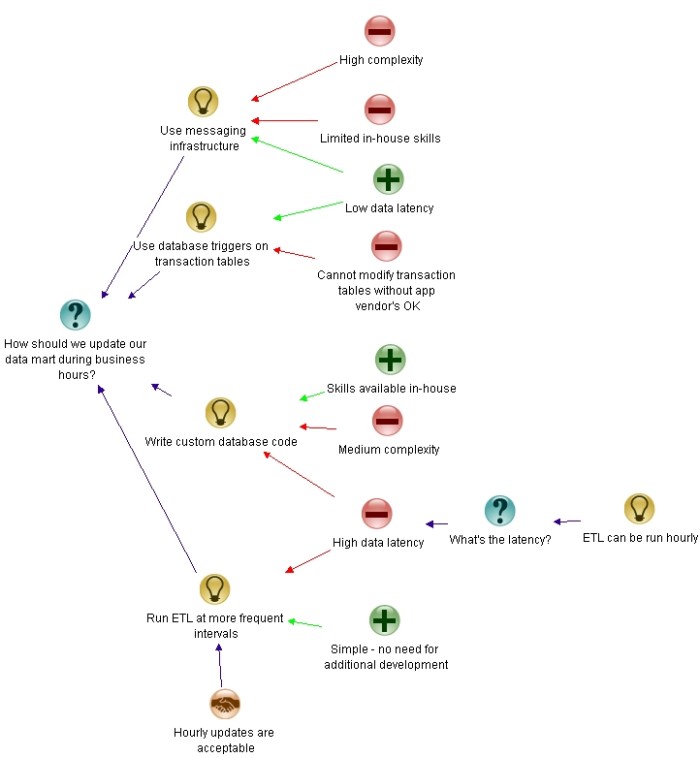
Example Issue Map
The map captures not only the decisions made, but also the options discussed and the arguments for and against each of the options. As such, it captures the decision along with the context, process and rationale behind it. In other words, it captures formal and informal knowledge pertaining to the decision. In this simple case, IBIS succeeded in making informal knowledge explicit. Project teams down the line can understand why the decision was made, from both a technical and business perspective.
It is worth noting that Compendium maps can reference external documents via Reference Nodes, which, though less important for argumentation, are extremely useful for documentation. Here is an illustration of how references to external documents can be inserted in an IBIS map through reference node:
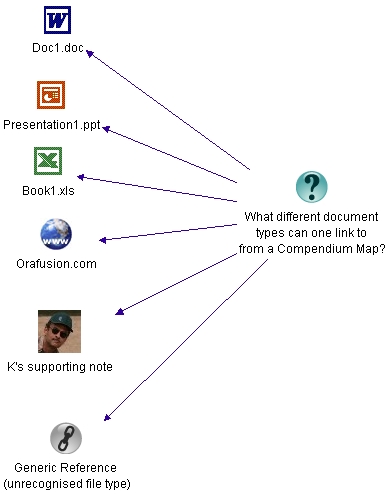
Links to external docs
As illustrated, this feature can be used to link out to a range of external documents – clicking on the reference node in a map (not the image above!) opens up the external document. Exploiting this, a project document can operate at two levels: the first being an IBIS map that depicts the relationships between issues, ideas and arguments, and the second being supporting documents that provide details on specific nodes or relationships. Much of the informal knowledge pertaining to the issue resides in the first level – i.e. in the relationships between nodes – and this knowledge is made explicit in the map.
To conclude, it is perhaps worth summarising the main points of this post. Projects generate new knowledge through a process in which issues and ideas are proposed, explored and trialled. Typically, most project documentation captures the outcome (formal knowledge), neglecting much of the context, background and process of discovery (informal knowledge). IBIS maps offer the possibility of capturing both aspects of knowledge, resulting in a greatly improved project (and hence organisational) memory.
Issues, Ideas and Arguments: A communication-centric approach to tackling project complexity
I’ve written a number of posts on complexity in projects, covering topics ranging from conceptual issues to models of project complexity. Despite all that verbiage, I’ve never addressed the key issue of how complexity should be handled. Methodologists claim, with some justification, that complexity can be tamed by adequate planning together with appropriate controlling and monitoring as the project progresses. Yet, personal experience – and the accounts of many others – suggests that the beast remains untamed. A few weeks ago, I read this brilliant series of articles by Paul Culmsee, where he discusses a technique called Dialogue Mapping which, among other things, may prove to be a dragon-slayer. In this post I present an overview of the technique and illustrate its utility in real-life project situations.
First a brief history: dialogue mapping has its roots in wicked problems – problems that are hard to solve, or even define, because they satisfy one or more of these criteria. (Note that there is a relationship between problem wickedness and project complexity: projects that set out to address or solve wicked problems are generally complex but the converse is not necessarily true – see this post for more). Over three decades ago, Horst Rittel – the man who coined the term “wicked problem” – and his colleague Werner Kunz developed a technique called Issue Based Information System (IBIS) to aid in the understanding of such problems. IBIS is based on the premise that wicked problems – or any contentious issues – can be understood by discussing them in terms of three essential elements: issues (or questions), ideas (or answers) and arguments (for or against ideas). IBIS was subsequently refined over the years by various research groups and independent investigators. Jeff Conklin, the inventor of dialogue mapping, was one of the main contributors to this effort.
Now, the beauty of IBIS is that it is very easy to learn. Basically it has only the three elements mentioned earlier – issues, ideas and arguments – and these can be connected only in ways specified by the IBIS grammar. The elements and syntax of the language can be illustrated in half a page – as I shall do in a minute. Before doing so, I should mention that there is an excellent, free software tool – Compendium – that supports the IBIS notation. I use it in the discussion and demo below. I recommend that you download and install Compendium before proceeding any further.
Go on, I’ll wait for you…
OK, let’s begin. IBIS has three elements which are illustrated in the Compendium map below:
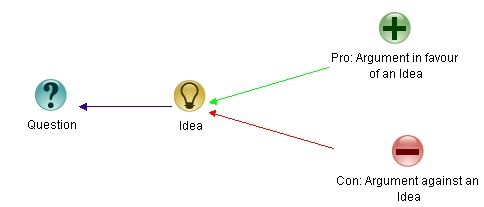
Figure 1: IBIS Elements
The elements are:
Question: an issue that’s being discussed or analysed. Note that the term “question” is synonymous with “issue”
Idea: a response to a question. An idea responds to a question in the sense that it offers a potential resolution or clarification of the question.
Argument: an argument in favour of or against an idea (a pro or a con)
The arrows show links or relationships between elements.
That’s it as far as elements of IBIS are concerned.
The IBIS grammar specifies the legal ways in which elements can be linked. The rules are nicely summarised in the following diagram:

Figure 2: Legal Links in IBIS
In a nutshell, the rules are:
- Any element (question, idea or agument) can be questioned.
- Ideas respond to questions.
- Arguments make the case for and against ideas. Note that questions cannot be argued!
Simple, isn’t it? Essentially that’s all there is to IBIS.
So what’s IBIS got to do with dialogue mapping? Well, dialogue mapping is facilitation of a group discussion using a shared display – a display that everyone participating in the discussion can see and add to. Typically the facilitator drives – i.e. modifies the display – seeking input from all participants, using the IBIS notation to capture the issues, ideas and arguments that come up. . This synchronous, or real-time, application of IBIS is described in Conklin’s book, Dialogue Mapping: Building Shared Understanding of Wicked Problems (An absolute must-read if you manage on complex projects with diverse stakeholders). For completeness, it is worth pointing out that IBIS can also be used asynchronously – for example, in dissecting arguments presented in papers and articles. This application of IBIS – which is essentially dialogue mapping minus facilitation – is sometimes called issue mapping.
I now describe a simple but realistic application of dialogue mapping, adapted from a real-life case. For brevity, I won’t reproduce the entire dialogue. Instead I’ll describe how a dialogue map develops as a discussion progresses. The example is a simple illustration of how IBIS can be used to facilitate a shared understanding (and solution) of a problem.
All set? OK, let’s go…
The situation: Our finance data mart is updated overnight through a batch job that takes a few hours. This is good enough for most purposes. However, a small (but very vocal!) number of users need to be able to report on transactions that have occurred within the last hour or so – waiting until the next day, especially during month-end, is simply not an option. The dev team had to figure out the best way to do this.
The location: my office.
The players: two colleagues from IT, one from finance, myself.
The shared display: Compendium running on my computer, visible to all the players.
The discussion was launched with the issue stated up-front: How should we update our data mart during business hours? My colleagues in the dev team came up with several ideas to address the issue. After capturing the issue and responding ideas, the map looked like this:

Figure 3: Map - stage 1
In brief, the options were to:
- Use our messaging infrastructure to carry out the update.
- Write database triggers on transaction tables. These triggers would update the data mart tables directly or indirectly.
- Write custom T-SQL procedures (or an SSIS package) to carry out the update (the database is SQL Server 2005).
- Run the relevant (already existing) Extract, Transform, Load (ETL) procedures at more frequent intervals – possibly several times during the day.
As the discussion progressed, the developers raised arguments for and against the ideas. A little later the map looked like this:

Figure 4: Map - stage 2
Note that data latency refers to the time interval between when the transaction occurs and its propagation to the data mart, and complexity is a rough measure of the effort required (in time) to implement that option. I won’t go through the arguments in detail, as they are largely self-explanatory.
The business rep then asked how often the ETL could be run.
“The relevant portions can be run hourly, if you really want to,” replied our ETL queen.
“That’s good enough,” said the business rep.
…voilà, we had a solution!
The final map looked much like the previous one: the only additions were the business rep’s question, the developer’s response and a node marking the decision made:
Figure 5: Final Map
Note that a decision node is simply an idea that is accepted (by all parties) as a decision on the issue being discussed.
Admittedly, my little example is nowhere near a complex project. However, before dismissing it outright, consider the following benefits afforded by the process of dialogue mapping:
- Everyone’s point of view was taken into account.
- The shared display served as a focal point of the discussion: the entire group contributed to the development of the map. Further, all points and arguments made were represented in the map.
- The display and discussion around it ensured a common (or shared) understanding of the problem.
- Once a shared understanding was achieved – between the business and IT in this case – the solution was almost obvious.
- The finished map serves as an intuitive summary of the discussion – any participant can go back to it and recall the essential structure of the discussion in a way that’s almost impossible through a written document. If you think that’s a tall claim, here’s a challenge: try reconstructing a meeting from the written minutes.
Enough said, I think.
But perhaps my simple example leaves you unconvinced. If so, I urge you to read Jeff Conklin’s reflections on an “industrial strength” case-study of dialogue mapping. Despite my limited practical experience with the technique, I believe it is an useful way to address issues that arise on complex projects, particularly those involving stakeholders with diverse points of view. That’s not to say that it is a panacea for project complexity – but then, nothing is. From a purely pragmatic perspective, it may be viewed as an addition to a project manager’s tool-chest of communication techniques. For, as I’ve noted elsewhere, “A shared world-view – which includes a common understanding of tools, terminology, culture, politics etc. – is what enables effective communication within a (project) group.” Dialogue mapping provides a practical means to achieve such a shared understanding.


 Eight to Late