A gentle introduction to text mining using R
Preamble
This article is based on my exploration of the basic text mining capabilities of R, the open source statistical software. It is intended primarily as a tutorial for novices in text mining as well as R. However, unlike conventional tutorials, I spend a good bit of time setting the context by describing the problem that led me to text mining and thence to R. I also talk about the limitations of the techniques I describe, and point out directions for further exploration for those who are interested. Indeed, I’ll likely explore some of these myself in future articles.
If you have no time and /or wish to cut to the chase, please go straight to the section entitled, Preliminaries – installing R and RStudio. If you have already installed R and have worked with it, you may want to stop reading as I doubt there’s anything I can tell you that you don’t already know 🙂
A couple of warnings are in order before we proceed. R and the text mining options we explore below are open source software. Version differences in open source can be significant and are not always documented in a way that corporate IT types are used to. Indeed, I was tripped up by such differences in an earlier version of this article (now revised). So, just for the record, the examples below were run on version 3.2.0 of R and version 0.6-1 of the tm (text mining) package for R. A second point follows from this: as is evident from its version number, the tm package is still in the early stages of its evolution. As a result – and we will see this below – things do not always work as advertised. So assume nothing, and inspect the results in detail at every step. Be warned that I do not always do this below, as my aim is introduction rather than accuracy.
Background and motivation
Traditional data analysis is based on the relational model in which data is stored in tables. Within tables, data is stored in rows – each row representing a single record of an entity of interest (such as a customer or an account). The columns represent attributes of the entity. For example, the customer table might consist of columns such as name, street address, city, postcode, telephone number . Typically these are defined upfront, when the data model is created. It is possible to add columns after the fact, but this tends to be messy because one also has to update existing rows with information pertaining to the added attribute.
As long as one asks for information that is based only on existing attributes – an example being, “give me a list of customers based in Sydney” – a database analyst can use Structured Query Language (the defacto language of relational databases ) to get an answer. A problem arises, however, if one asks for information that is based on attributes that are not included in the database. An example in the above case would be: “give me a list of customers who have made a complaint in the last twelve months.”
As a result of the above, many data modelers will include a “catch-all” free text column that can be used to capture additional information in an ad-hoc way. As one might imagine, this column will often end up containing several lines, or even paragraphs of text that are near impossible to analyse with the tools available in relational databases.
(Note: for completeness I should add that most database vendors have incorporated text mining capabilities into their products. Indeed, many of them now include R…which is another good reason to learn it.)
My story
Over the last few months, when time permits, I’ve been doing an in-depth exploration of the data captured by my organisation’s IT service management tool. Such tools capture all support tickets that are logged, and track their progress until they are closed. As it turns out, there are a number of cases where calls are logged against categories that are too broad to be useful – the infamous catch-all category called “Unknown.” In such cases, much of the important information is captured in a free text column, which is difficult to analyse unless one knows what one is looking for. The problem I was grappling with was to identify patterns and hence define sub-categories that would enable support staff to categorise these calls meaningfully.
One way to do this is to guess what the sub-categories might be…and one can sometimes make pretty good guesses if one knows the data well enough. In general, however, guessing is a terrible strategy because one does not know what one does not know. The only sensible way to extract subcategories is to analyse the content of the free text column systematically. This is a classic text mining problem.
Now, I knew a bit about the theory of text mining, but had little practical experience with it. So the logical place for me to start was to look for a suitable text mining tool. Our vendor (who shall remain unnamed) has a “Rolls-Royce” statistical tool that has a good text mining add-on. We don’t have licenses for the tool, but the vendor was willing to give us a trial license for a few months…with the understanding that this was on an intent-to-purchase basis.
I therefore started looking at open source options. While doing so, I stumbled on an interesting paper by Ingo Feinerer that describes a text mining framework for the R environment. Now, I knew about R, and was vaguely aware that it offered text mining capabilities, but I’d not looked into the details. Anyway, I started reading the paper…and kept going until I finished.
As I read, I realised that this could be the answer to my problems. Even better, it would not require me trade in assorted limbs for a license.
I decided to give it a go.
Preliminaries – installing R and RStudio
R can be downloaded from the R Project website. There is a Windows version available, which installed painlessly on my laptop. Commonly encountered installation issues are answered in the (very helpful) R for Windows FAQ.
RStudio is an integrated development environment (IDE) for R. There is a commercial version of the product, but there is also a free open source version. In what follows, I’ve used the free version. Like R, RStudio installs painlessly and also detects your R installation.
RStudio has the following panels:
- A script editor in which you can create R scripts (top left). You can also open a new script editor window by going to File > New File > RScript.
- The console where you can execute R commands/scripts (bottom left)
- Environment and history (top right)
- Files in the current working directory, installed R packages, plots and a help display screen (bottom right).
Check out this short video for a quick introduction to RStudio.
You can access help anytime (within both R and RStudio) by typing a question mark before a command. Exercise: try this by typing ?getwd() and ?setwd() in the console.
I should reiterate that the installation process for both products was seriously simple…and seriously impressive. “Rolls-Royce” business intelligence vendors could take a lesson from that…in addition to taking a long hard look at the ridiculous prices they charge.
There is another small step before we move on to the fun stuff. Text mining and certain plotting packages are not installed by default so one has to install them manually The relevant packages are:
- tm – the text mining package (see documentation). Also check out this excellent introductory article on tm.
- SnowballC – required for stemming (explained below).
- ggplot2 – plotting capabilities (see documentation)
- wordcloud – which is self-explanatory (see documentation) .
(Warning for Windows users: R is case-sensitive so Wordcloud != wordcloud)
The simplest way to install packages is to use RStudio’s built in capabilities (go to Tools > Install Packages in the menu). If you’re working on Windows 7 or 8, you might run into a permissions issue when installing packages. If you do, you might find this advice from the R for Windows FAQ helpful.
Preliminaries – The example dataset
The data I had from our service management tool isn’t the best dataset to learn with as it is quite messy. But then, I have a reasonable data source in my virtual backyard: this blog. To this end, I converted all posts I’ve written since Dec 2013 into plain text form (30 posts in all). You can download the zip file of these here .
I suggest you create a new folder called – called, say, TextMining – and unzip the files in that folder.
That done, we’re good to start…
Preliminaries – Basic Navigation
A few things to note before we proceed:
- In what follows, I enter the commands directly in the console. However, here’s a little RStudio tip that you may want to consider: you can enter an R command or code fragment in the script editor and then hit Ctrl-Enter (i.e. hit the Enter key while holding down the Control key) to copy the line to the console. This will enable you to save the script as you go along.
- In the code snippets below, the functions / commands to be typed in the R console are in blue font. The output is in black. I will also denote references to functions / commands in the body of the article by italicising them as in “setwd()”. Be aware that I’ve omitted the command prompt “>” in the code snippets below!
- It is best not to cut-n-paste commands directly from the article as quotes are sometimes not rendered correctly. A text file of all the code in this article is available here.
The > prompt in the RStudio console indicates that R is ready to process commands.
To see the current working directory type in getwd() and hit return. You’ll see something like:
[1] “C:/Users/Documents”
The exact output will of course depend on your working directory. Note the forward slashes in the path. This is because of R’s Unix heritage (backslash is an escape character in R.). So, here’s how would change the working directory to C:\Users:
You can now use getwd()to check that setwd() has done what it should.
[1]”C:/Users”
I won’t say much more here about R as I want to get on with the main business of the article. Check out this very short introduction to R for a quick crash course.
Loading data into R
Start RStudio and open the TextMining project you created earlier.
The next step is to load the tm package as this is not loaded by default. This is done using the library() function like so:
Dependent packages are loaded automatically – in this case the dependency is on the NLP (natural language processing) package.
Next, we need to create a collection of documents (technically referred to as a Corpus) in the R environment. This basically involves loading the files created in the TextMining folder into a Corpus object. The tm package provides the Corpus() function to do this. There are several ways to create a Corpus (check out the online help using ? as explained earlier). In a nutshell, the Corpus() function can read from various sources including a directory. That’s the option we’ll use:
docs <- Corpus(DirSource(“C:/Users/Kailash/Documents/TextMining”))
At the risk of stating the obvious, you will need to tailor this path as appropriate.
A couple of things to note in the above. Any line that starts with a # is a comment, and the “<-“ tells R to assign the result of the command on the right hand side to the variable on the left hand side. In this case the Corpus object created is stored in a variable called docs. One can also use the equals sign (=) for assignment if one wants to.
Type in docs to see some information about the newly created corpus:
Metadata: corpus specific: 0, document level (indexed): 0
Content: documents: 30
The summary() function gives more details, including a complete listing of files…but it isn’t particularly enlightening. Instead, we’ll examine a particular document in the corpus.
writeLines(as.character(docs[[30]]))
Which prints the entire content of 30th document in the corpus to the console.
Pre-processing
Data cleansing, though tedious, is perhaps the most important step in text analysis. As we will see, dirty data can play havoc with the results. Furthermore, as we will also see, data cleaning is invariably an iterative process as there are always problems that are overlooked the first time around.
The tm package offers a number of transformations that ease the tedium of cleaning data. To see the available transformations type getTransformations() at the R prompt:
> getTransformations()
[1] “removeNumbers” “removePunctuation” “removeWords” “stemDocument” “stripWhitespace”
Most of these are self-explanatory. I’ll explain those that aren’t as we go along.
There are a few preliminary clean-up steps we need to do before we use these powerful transformations. If you inspect some documents in the corpus (and you know how to do that now), you will notice that I have some quirks in my writing. For example, I often use colons and hyphens without spaces between the words separated by them. Using the removePunctuation transform without fixing this will cause the two words on either side of the symbols to be combined. Clearly, we need to fix this prior to using the transformations.
To fix the above, one has to create a custom transformation. The tm package provides the ability to do this via the content_transformer function. This function takes a function as input, the input function should specify what transformation needs to be done. In this case, the input function would be one that replaces all instances of a character by spaces. As it turns out the gsub() function does just that.
Here is the R code to build the content transformer, which we will call toSpace:
Now we can use this content transformer to eliminate colons and hypens like so:
docs <- tm_map(docs, toSpace, “:”)
Inspect random sections f corpus to check that the result is what you intend (use writeLines as shown earlier). To reiterate something I mentioned in the preamble, it is good practice to inspect the a subset of the corpus after each transformation.
If it all looks good, we can now apply the removePunctuation transformation. This is done as follows:
Inspecting the corpus reveals that several “non-standard” punctuation marks have not been removed. These include the single curly quote marks and a space-hyphen combination. These can be removed using our custom content transformer, toSpace. Note that you might want to copy-n-paste these symbols directly from the relevant text file to ensure that they are accurately represented in toSpace.
docs <- tm_map(docs, toSpace, “‘”)
docs <- tm_map(docs, toSpace, ” -“)
Inspect the corpus again to ensure that the offenders have been eliminated. This is also a good time to check for any other special symbols that may need to be removed manually.
If all is well, you can move to the next step which is to:
- Convert the corpus to lower case
- Remove all numbers.
Since R is case sensitive, “Text” is not equal to “text” – and hence the rationale for converting to a standard case. However, although there is a tolower transformation, it is not a part of the standard tm transformations (see the output of getTransformations() in the previous section). For this reason, we have to convert tolower into a transformation that can handle a corpus object properly. This is done with the help of our new friend, content_transformer.
Here’s the relevant code:
docs <- tm_map(docs,content_transformer(tolower))
Text analysts are typically not interested in numbers since these do not usually contribute to the meaning of the text. However, this may not always be so. For example, it is definitely not the case if one is interested in getting a count of the number of times a particular year appears in a corpus. This does not need to be wrapped in content_transformer as it is a standard transformation in tm.
docs <- tm_map(docs, removeNumbers)
Once again, be sure to inspect the corpus before proceeding.
The next step is to remove common words from the text. These include words such as articles (a, an, the), conjunctions (and, or but etc.), common verbs (is), qualifiers (yet, however etc) . The tm package includes a standard list of such stop words as they are referred to. We remove stop words using the standard removeWords transformation like so:
docs <- tm_map(docs, removeWords, stopwords(“english”))
Finally, we remove all extraneous whitespaces using the stripWhitespace transformation:
docs <- tm_map(docs, stripWhitespace)
Stemming
Typically a large corpus will contain many words that have a common root – for example: offer, offered and offering. Stemming is the process of reducing such related words to their common root, which in this case would be the word offer.
Simple stemming algorithms (such as the one in tm) are relatively crude: they work by chopping off the ends of words. This can cause problems: for example, the words mate and mating might be reduced to mat instead of mate. That said, the overall benefit gained from stemming more than makes up for the downside of such special cases.
To see what stemming does, let’s take a look at the last few lines of the corpus before and after stemming. Here’s what the last bit looks like prior to stemming (note that this may differ for you, depending on the ordering of the corpus source files in your directory):
flexibility eye beholder action increase organisational flexibility say redeploying employees likely seen affected move constrains individual flexibility dual meaning characteristic many organizational platitudes excellence synergy andgovernance interesting exercise analyse platitudes expose difference espoused actual meanings sign wishing many hours platitude deconstructing fun
Now let’s stem the corpus and reinspect it.
writeLines(as.character(docs[[30]]))
flexibl eye behold action increas organis flexibl say redeploy employe like seen affect move constrain individu flexibl dual mean characterist mani organiz platitud excel synergi andgovern interest exercis analys platitud expos differ espous actual mean sign wish mani hour platitud deconstruct fun
A careful comparison of the two paragraphs reveals the benefits and tradeoff of this relatively crude process.
There is a more sophisticated procedure called lemmatization that takes grammatical context into account. Among other things, determining the lemma of a word requires a knowledge of its part of speech (POS) – i.e. whether it is a noun, adjective etc. There are POS taggers that automate the process of tagging terms with their parts of speech. Although POS taggers are available for R (see this one, for example), I will not go into this topic here as it would make a long post even longer.
On another important note, the output of the corpus also shows up a problem or two. First, organiz and organis are actually variants of the same stem organ. Clearly, they should be merged. Second, the word andgovern should be separated out into and and govern (this is an error in the original text). These (and other errors of their ilk) can and should be fixed up before proceeding. This is easily done using gsub() wrapped in content_transformer. Here is the code to clean up these and a few other issues that I found:
Note that I have removed the stop words and and in in the 3rd and 4th transforms above.
There are definitely other errors that need to be cleaned up, but I’ll leave these for you to detect and remove.
The document term matrix
The next step in the process is the creation of the document term matrix (DTM)– a matrix that lists all occurrences of words in the corpus, by document. In the DTM, the documents are represented by rows and the terms (or words) by columns. If a word occurs in a particular document, then the matrix entry for corresponding to that row and column is 1, else it is 0 (multiple occurrences within a document are recorded – that is, if a word occurs twice in a document, it is recorded as “2” in the relevant matrix entry).
A simple example might serve to explain the structure of the TDM more clearly. Assume we have a simple corpus consisting of two documents, Doc1 and Doc2, with the following content:
Doc1: bananas are yellow
Doc2: bananas are good
The DTM for this corpus would look like:
| bananas | are | yellow | good | |
| Doc1 | 1 | 1 | 1 | 0 |
| Doc2 | 1 | 1 | 0 | 1 |
Clearly there is nothing special about rows and columns – we could just as easily transpose them. If we did so, we’d get a term document matrix (TDM) in which the terms are rows and documents columns. One can work with either a DTM or TDM. I’ll use the DTM in what follows.
There are a couple of general points worth making before we proceed. Firstly, DTMs (or TDMs) can be huge – the dimension of the matrix would be number of document x the number of words in the corpus. Secondly, it is clear that the large majority of words will appear only in a few documents. As a result a DTM is invariably sparse – that is, a large number of its entries are 0.
The business of creating a DTM (or TDM) in R is as simple as:
This creates a term document matrix from the corpus and stores the result in the variable dtm. One can get summary information on the matrix by typing the variable name in the console and hitting return:
<<DocumentTermMatrix (documents: 30, terms: 4209)>>
Non-/sparse entries: 14252/112018
Sparsity : 89%
Maximal term length: 48
Weighting : term frequency (tf)
This is a 30 x 4209 dimension matrix in which 89% of the rows are zero.
One can inspect the DTM, and you might want to do so for fun. However, it isn’t particularly illuminating because of the sheer volume of information that will flash up on the console. To limit the information displayed, one can inspect a small section of it like so:
<<DocumentTermMatrix (documents: 2, terms: 6)>>
Non-/sparse entries: 0/12
Sparsity : 100%
Maximal term length: 8
Weighting : term frequency (tf)
Docs creation creativ credibl credit crimin crinkl
BeyondEntitiesAndRelationships.txt 0 0 0 0 0 0
bigdata.txt 0 0 0 0 0 0
This command displays terms 1000 through 1005 in the first two rows of the DTM. Note that your results may differ.
Mining the corpus
Notice that in constructing the TDM, we have converted a corpus of text into a mathematical object that can be analysed using quantitative techniques of matrix algebra. It should be no surprise, therefore, that the TDM (or DTM) is the starting point for quantitative text analysis.
For example, to get the frequency of occurrence of each word in the corpus, we simply sum over all rows to give column sums:
Here we have first converted the TDM into a mathematical matrix using the as.matrix() function. We have then summed over all rows to give us the totals for each column (term). The result is stored in the (column matrix) variable freq.
Check that the dimension of freq equals the number of terms:
length(freq)
[1] 4209
Next, we sort freq in descending order of term count:
ord <- order(freq,decreasing=TRUE)
Then list the most and least frequently occurring terms:
freq[head(ord)]
one organ can manag work system
314 268 244 222 202 193
#inspect least frequently occurring terms
freq[tail(ord)]
yield yorkshir youtub zeno zero zulli
1 1 1 1 1 1
The least frequent terms can be more interesting than one might think. This is because terms that occur rarely are likely to be more descriptive of specific documents. Indeed, I can recall the posts in which I have referred to Yorkshire, Zeno’s Paradox and Mr. Lou Zulli without having to go back to the corpus, but I’d have a hard time enumerating the posts in which I’ve used the word system.
There are at least a couple of ways to simple ways to strike a balance between frequency and specificity. One way is to use so-called inverse document frequencies. A simpler approach is to eliminate words that occur in a large fraction of corpus documents. The latter addresses another issue that is evident in the above. We deal with this now.
Words like “can” and “one” give us no information about the subject matter of the documents in which they occur. They can therefore be eliminated without loss. Indeed, they ought to have been eliminated by the stopword removal we did earlier. However, since such words occur very frequently – virtually in all documents – we can remove them by enforcing bounds when creating the DTM, like so:
bounds = list(global = c(3,27))))
Here we have told R to include only those words that occur in 3 to 27 documents. We have also enforced lower and upper limit to length of the words included (between 4 and 20 characters).
Inspecting the new DTM:
<<DocumentTermMatrix (documents: 30, terms: 1290)>>
Non-/sparse entries: 10002/28698
Sparsity : 74%
Maximal term length: 15
Weighting : term frequency (tf)
The dimension is reduced to 30 x 1290.
Let’s calculate the cumulative frequencies of words across documents and sort as before:
#length should be total number of terms
length(freqr)
[1] 1290
#create sort order (asc)
ordr <- order(freqr,decreasing=TRUE)
#inspect most frequently occurring terms
freqr[head(ordr)]
organ manag work system project problem
268 222 202 193 184 171
#inspect least frequently occurring terms
freqr[tail(ordr)]
wait warehous welcom whiteboard wider widespread
3 3 3 3 3 3
The results make sense: the top 6 keywords are pretty good descriptors of what my blogs is about – projects, management and systems. However, not all high frequency words need be significant. What they do, is give you an idea of potential classification terms.
That done, let’s take get a list of terms that occur at least a 100 times in the entire corpus. This is easily done using the findFreqTerms() function as follows:
[1] “action” “approach” “base” “busi” “chang” “consult” “data” “decis” “design”
[10] “develop” “differ” “discuss” “enterpris” “exampl” “group” “howev” “import” “issu”
[19] “like” “make” “manag” “mani” “model” “often” “organ” “peopl” “point”
[28] “practic” “problem” “process” “project” “question” “said” “system” “thing” “think”
[37] “time” “understand” “view” “well” “will” “work”
Here I have asked findFreqTerms() to return all terms that occur more than 80 times in the entire corpus. Note, however, that the result is ordered alphabetically, not by frequency.
Now that we have the most frequently occurring terms in hand, we can check for correlations between some of these and other terms that occur in the corpus. In this context, correlation is a quantitative measure of the co-occurrence of words in multiple documents.
The tm package provides the findAssocs() function to do this. One needs to specify the DTM, the term of interest and the correlation limit. The latter is a number between 0 and 1 that serves as a lower bound for the strength of correlation between the search and result terms. For example, if the correlation limit is 1, findAssocs() will return only those words that always co-occur with the search term. A correlation limit of 0.5 will return terms that have a search term co-occurrence of at least 50% and so on.
Here are the results of running findAssocs() on some of the frequently occurring terms (system, project, organis) at a correlation of 60%.
project
inher 0.82
handl 0.68
manag 0.68
occurr 0.68
manager’ 0.66
enterpris
agil 0.80
realist 0.78
increment 0.77
upfront 0.77
technolog 0.70
neither 0.69
solv 0.69
adapt 0.67
architectur 0.67
happi 0.67
movement 0.67
architect 0.66
chanc 0.65
fine 0.64
featur 0.63
system
design 0.78
subset 0.78
adopt 0.77
user 0.77
involv 0.71
specifi 0.71
function 0.70
intend 0.67
softwar 0.67
step 0.67
compos 0.66
intent 0.66
specif 0.66
depart 0.65
phone 0.63
frequent 0.62
today 0.62
pattern 0.61
cognit 0.60
wherea 0.60
An important point to note that the presence of a term in these list is not indicative of its frequency. Rather it is a measure of the frequency with which the two (search and result term) co-occur (or show up together) in documents across . Note also, that it is not an indicator of nearness or contiguity. Indeed, it cannot be because the document term matrix does not store any information on proximity of terms, it is simply a “bag of words.”
That said, one can already see that the correlations throw up interesting combinations – for example, project and manag, or enterpris and agil or architect/architecture, or system and design or adopt. These give one further insights into potential classifications.
As it turned out, the very basic techniques listed above were enough for me to get a handle on the original problem that led me to text mining – the analysis of free text problem descriptions in my organisation’s service management tool. What I did was to work my way through the top 50 terms and find their associations. These revealed a number of sets of keywords that occurred in multiple problem descriptions, which was good enough for me to define some useful sub-categories. These are currently being reviewed by the service management team. While they’re busy with that that, I’m looking into refining these further using techniques such as cluster analysis and tokenization. A simple case of the latter would be to look at two-word combinations in the text (technically referred to as bigrams). As one might imagine, the dimensionality of the DTM will quickly get out of hand as one considers larger multi-word combinations.
Anyway, all that and more will topics have to wait for future articles as this piece is much too long already. That said, there is one thing I absolutely must touch upon before signing off. Do stay, I think you’ll find it interesting.
Basic graphics
One of the really cool things about R is its graphing capability. I’ll do just a couple of simple examples to give you a flavour of its power and cool factor. There are lots of nice examples on the Web that you can try out for yourself.
Let’s first do a simple frequency histogram. I’ll use the ggplot2 package, written by Hadley Wickham to do this. Here’s the code:
library(ggplot2)
p <- ggplot(subset(wf, freqr>100), aes(term, occurrences))
p <- p + geom_bar(stat=”identity”)
p <- p + theme(axis.text.x=element_text(angle=45, hjust=1))
p
Figure 1 shows the result.

Fig 1: Term-occurrence histogram (freq>100)
The first line creates a data frame – a list of columns of equal length. A data frame also contains the name of the columns – in this case these are term and occurrence respectively. We then invoke ggplot(), telling it to consider plot only those terms that occur more than 100 times. The aes option in ggplot describes plot aesthetics – in this case, we use it to specify the x and y axis labels. The stat=”identity” option in geom_bar () ensures that the height of each bar is proportional to the data value that is mapped to the y-axis (i.e occurrences). The last line specifies that the x-axis labels should be at a 45 degree angle and should be horizontally justified (see what happens if you leave this out). Check out the voluminous ggplot documentation for more or better yet, this quick introduction to ggplot2 by Edwin Chen.
Finally, let’s create a wordcloud for no other reason than everyone who can seems to be doing it. The code for this is:
library(wordcloud)
#setting the same seed each time ensures consistent look across clouds
set.seed(42)
#limit words by specifying min frequency
wordcloud(names(freqr),freqr, min.freq=70)
The result is shown Figure 2.
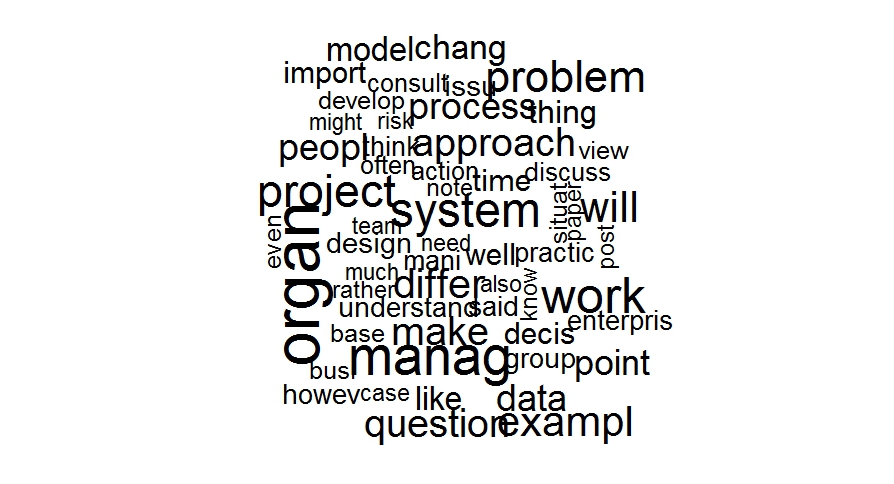
Fig 2: Wordcloud (freq>70)
Here we first load the wordcloud package which is not loaded by default. Setting a seed number ensures that you get the same look each time (try running it without setting a seed). The arguments of the wordcloud() function are straightforward enough. Note that one can specify the maximum number of words to be included instead of the minimum frequency (as I have done above). See the word cloud documentation for more.
This word cloud also makes it clear that stop word removal has not done its job well, there are a number of words it has missed (also and however, for example). These can be removed by augmenting the built-in stop word list with a custom one. This is left as an exercise for the reader :-).
Finally, one can make the wordcloud more visually appealing by adding colour as follows:
wordcloud(names(freqr),freqr,min.freq=70,colors=brewer.pal(6,”Dark2″))
The result is shown Figure 3.

Fig 3: Wordcloud (freq > 70)
You may need to load the RColorBrewer package to get this to work. Check out the brewer documentation to experiment with more colouring options.
Wrapping up
This brings me to the end of this rather long (but I hope, comprehensible) introduction to text mining R. It should be clear that despite the length of the article, I’ve covered only the most rudimentary basics. Nevertheless, I hope I’ve succeeded in conveying a sense of the possibilities in the vast and rapidly-expanding discipline of text analytics.
Note added on July 22nd, 2015:
If you liked this piece, you may want to check out the sequel – a gentle introduction to cluster analysis using R.
Note added on September 29th 2015:
…and my introductory piece on topic modeling.
Note added on December 3rd 2015:
…and my article on visualizing relationships between documents.
Big Data metaphors we live by
“When Big Data metaphors erase human sensemaking, and the ways in which values are baked into categories, algorithms and visualizations, we have indeed lost the plot, not found it…”
Quoted from my essay on metaphors for Big Data, co-written with Simon Buckingham Shum:

Sherlock Holmes and the case of the management fetish
As narrated by Dr. John Watson, M.D.…
As my readers are undoubtedly aware, my friend Sherlock Holmes is widely feted for his powers of logic and deduction. With all due modesty, I can claim to have played a small part in publicizing his considerable talents, for I have a sense for what will catch the reading public’s fancy and, perhaps more important, what will not. Indeed, it could be argued that his fame is in no small part due to the dramatic nature of the exploits which I have chosen to publicise.
Management consulting, though far more lucrative than criminal investigation, is not nearly as exciting. Consequently my work has become that much harder since Holmes reinvented himself as a management expert. Nevertheless, I am firmly of the opinion that the long-standing myths exposed by his recent work more than make up for any lack of suspense or drama.
A little known fact is that many of Holmes’ insights into flawed management practices have come after the fact, by discerning common themes that emerged from different cases. Of course this makes perfect sense: only after seeing the same (or similar) mistake occur in a variety of situations can one begin to perceive an underlying pattern.
The conversation I had with him last night is an excellent illustration of this point.
—
We were having dinner at Holmes’ Baker Street abode when, apropos of nothing, he remarked, “It’s a strange thing, Watson, that our lives are governed by routine. For instance, it is seven in the evening, and here we are having dinner, much like we would on any other day.”
“Yes, it is,” I said, intrigued by his remark. Dabbing my mouth with a napkin, I put down my fork and waited for him to say more.
He smiled. “…and do you think that is a good thing?”
I thought about it for a minute before responding. “Well, we follow routine because we like…or need… regularity and predictability,” I said. “Indeed, as a medical man, I know well that our bodies have built in clocks that drive us to do things – such as eat and sleep – at regular intervals. That apart, routines give us a sense of comfort and security in an unpredictable world. Even those who are adventurous have routines of their own. I don’t think we have a choice in the matter, it’s the way humans are wired.” I wondered where the conversation was going.
Holmes cocked an eyebrow. “Excellent, Watson!” he said. “Our propensity for routine is quite possibly a consequence of our need for security and comfort ….but what about the usefulness of routines – apart from the sense of security we get from them?”
“Hmmm…that’s an interesting question. I suppose a routine must have a benefit, or at least a perceived benefit…else it would not have been made into a routine.”
“Possibly,” said Holmes, “ but let me ask you another question. You remember the case of the failed projects do you not?”
“Yes, I do,” I replied. Holmes’ abrupt conversational U-turns no longer disconcert me, I’ve become used to them over the years. I remembered the details of the case like it had happened yesterday…indeed I should, as it was I who wrote the narrative!
“Did anything about the case strike you as strange?” he inquired.
I mulled over the case, which (in hindsight) was straightforward enough. Here are the essential facts:
The organization suffered from a high rate of project failure (about 70% as I recall). The standard prescription – project post-mortems followed by changes in processes aimed at addressing the top issues revealed – had failed to resolve the issue. Holmes’ insightful diagnosis was that the postmortems identified symptoms, not causes. Therefore the measures taken to fix the problems didn’t work because they did not address the underlying cause. Indeed, the measures were akin to using brain surgery to fix a headache. In the end, Holmes concluded that the failures were a consequence of flawed organizational structures and norms.
Of course flawed structures and norms are beyond the purview of a mere project or program manager. So Holmes’ diagnosis, though entirely correct, did not help Bryant (the manager who had consulted us).
Nothing struck me as unduly strange as went over the facts mentally. No,” I replied, “but what on earth does that have to do with routine?”
He smiled. “I will explain presently, but I have yet another question for you before I do so. Do you remember one of our earliest management consulting cases – the affair of the terminated PMO?”
I replied in the affirmative.
“Well then, you see the common thread running through the two cases, don’t you?” Seeing my puzzled look, he added, “think about it for a minute, Watson, while I go and fetch dessert.”
He went into the kitchen, leaving me to ponder his question.
The only commonality I could see was the obvious one – both cases were related to the failure of PMOs. (Editor’s note: PMO = Project Management Office)
He returned with dessert a few minutes later. “So, Watson,” he said as he sat down, “have you come up with anything?
I told him what I thought.
“Capital, Watson! Then you will, no doubt, have asked yourself the obvious next question. ”
I saw what he was getting at. “Yes! The question is: can this observation be generalised? Do majority of PMOs fail? ”
“Brilliant, Watson. You are getting better at this by the day.” I know Holmes does not intend to sound condescending, but the sad fact is that he often does. “Let me tell you,” he continued, “Research suggests that 50% of PMOs fail within three years of being set up. My hypothesis is that failure rate would be considerably higher if the timeframe is increased to five or seven years. What’s even more interesting is that there is a single overriding complaint about PMOs: the majority of stakeholders surveyed felt that their PMOs are overly bureaucratic, and generally hinder project work.”
“But isn’t that contrary to the aim of a PMO – which, as I understand, is to facilitate project work?” I queried.
“Excellent, my dear Watson. You are getting close to the heart of the matter.
“I am?” To be honest, I was a little lost.
“Ah Watson, don’t tell me you do not see it,” said Holmes exasperatedly.
“I’m afraid you’ll have to explain,” I replied curtly. Really, he could insufferable at times.
“I shall do my best. You see, there is a fundamental contradiction between the stated mission and actual operation of a typical PMO. In theory, they are supposed to facilitate projects, but as far as executive management is concerned this is synonymous with overseeing and controlling projects. What this means is that in practice, PMOs inevitably end up policing project work rather than facilitating it.”
I wasn’t entirely convinced. “May be the reason that PMOs fail is that organisations do not implement them correctly,” I said.
“Ah, the famous escape clause used by purveyors of best practices – if our best practice doesn’t work, it means you aren’t implementing it correctly. Pardon me while I choke on my ale, because that is utter nonsense.”
“Why?”
“Well, one would expect after so many years, these so-called implementation errors would have been sorted out. Yet we see the same poor outcomes over and over again,” said Holmes.
“OK, but then why are PMOs are still so popular with management?”
“Now we come to the crux of matter, Watson,” he said, a tad portentously, “They are popular for reasons we spoke of at the start of this conversation – comfort and security.”
“Comfort and security? I have no idea what you’re talking about.”
“Let me try explaining this in another way,” he said. “When you were a small child, you must have had some object that you carried around everywhere…a toy, perhaps…did you not?”
“I’m not sure I should tell you this Holmes but, yes, I had a blanket”
“A security blanket, I would never have guessed, Watson,” smiled Holmes. “…but as it happens that’s a perfect example because PMOs and the methodologies they enforce are security blankets. They give executives and frontline managers a sense that they are doing something concrete and constructive to manage uncertainty…even though they actually aren’t. PMOs are popular , not because they work (and indeed, we’ve seen they don’t) but because they help managers contain their anxiety about whether things will turn out right. I would not be exaggerating if I said that PMOs and the methodologies they evangelise are akin to lucky charms or fetishes.”
“That’s a strong a statement to make on rather slim grounds,” I said dubiously.
“Is it? Think about it, Watson,” he shot back, with a flash of irritation. “Many (though I should admit, not all) PMOs and methodologies prescribe excruciatingly detailed procedures to follow and templates to fill when managing projects. For many (though again, not all) project managers, managing a project is synonymous with following these rituals. Such managers attempt to force-fit reality into standardised procedures and documents. But tell me, Watson – how can such project management by ritual work when no two projects are the same?”
“Hmm….”
“That is not all, Watson,” he continued, before I could respond, “PMOs and methodologies enable people to live in a fantasy world where everything seems to be under control. Methodology fetishists will not see the gap between their fantasy world and reality, and will therefore miss opportunities to learn. They follow rituals that give them security and an illusion of efficiency, but at the price of a genuine engagement with people and projects.”
“ I’ll have to think about it,” I said.
“You do that,” he replied , as he pushed back his chair and started to clear the table. Unlike him, I had a lot more than dinner to digest. Nevertheless, I rose to help him as I do every day.
Evening conversations at 221B Baker Street are seldom boring. Last night was no exception.
—
Acknowledgement:
This tale was inspired David Wastell’s brilliant paper, The fetish of technique: methodology as social defence (abstract only).


 Eight to Late